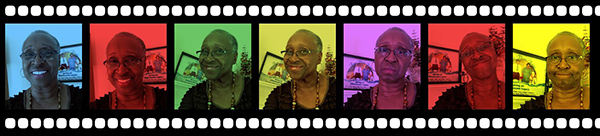
OBJECTIVE: Create a film strip of similar images (e.g., selfies), and tint them in Processing.
- Use for() or while() loop for the small white rectangles on the film. Also the rectangles have to have round corners like a film strip.
- If you don’t want to use selfies, you may use other pictures taken from your own camera. They must be thematic in some way. Examples: campus snapshots, club members, family members, pets, insects taken with your camera, etc. In other words, make it personal so that you’ll have more of a stake in it and so that you can get the extra experience of manipulating images.
- Use at least 5 images. The images have to be uniform width & height.
- IMPORTANT! You must use a graphic editor such as Photopea to resize & crop each picture to fit the frames of the filmstrip. Do not try to get by without resizing because it may cause your images to display poorly (squished pixels). The maximum width of an image for this assignment is 200px. Therefore, your Processing window will be a little over 1,000 width. If the actual width of any of your images is more than 200px, 8 points will automatically be deducted from your grade.
- Tint the frames of your images in interesting ways. The sky is the limit. For instance may decide to tint each one or use the mouse to control tinting. Another example would be to apply a pop art effect similar to Andy Warhol. Feel free to go above and beyond.
SUBMIT:
- No need to do write-up, but be sure to /*comment*/ amply so that I can follow it easily.
- Due date: November, Tues Nov. 18
- Zip up the folder - The dropbox is called “Filmstrip assignment”
Here's an example below.